
One of the key elements for a robot is the ability to receive feedback from the environment. The V5 Sensors bring the quality and abundance of feedback to a whole new level for educational and competition robots.
AI Vision Sensor
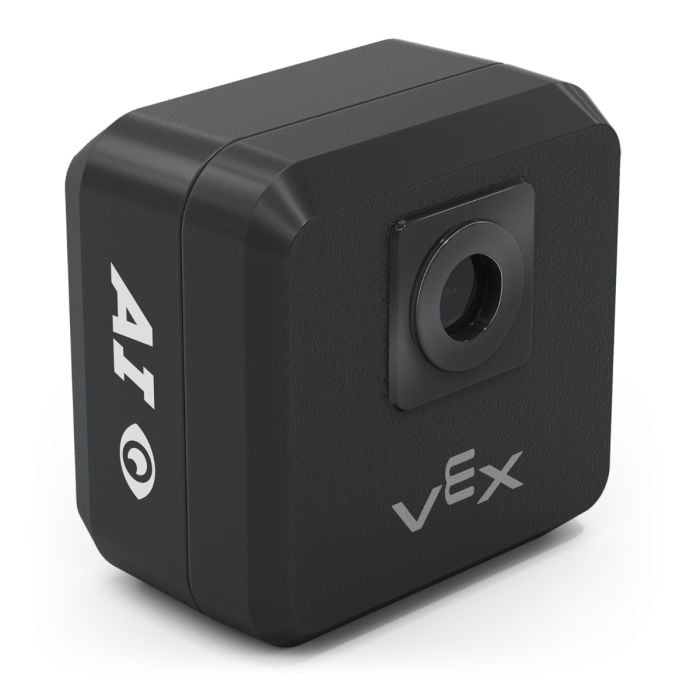
The AI Vision Sensor can detect the following:
- Color blob detection of up to 7 colors at once
- Color code detection
- AI object detection of VEX Classroom Game objects (Cube, Buckyball, Ring)
- AI object detection of VEX Robotics Competition game objects
- AprilTag detection
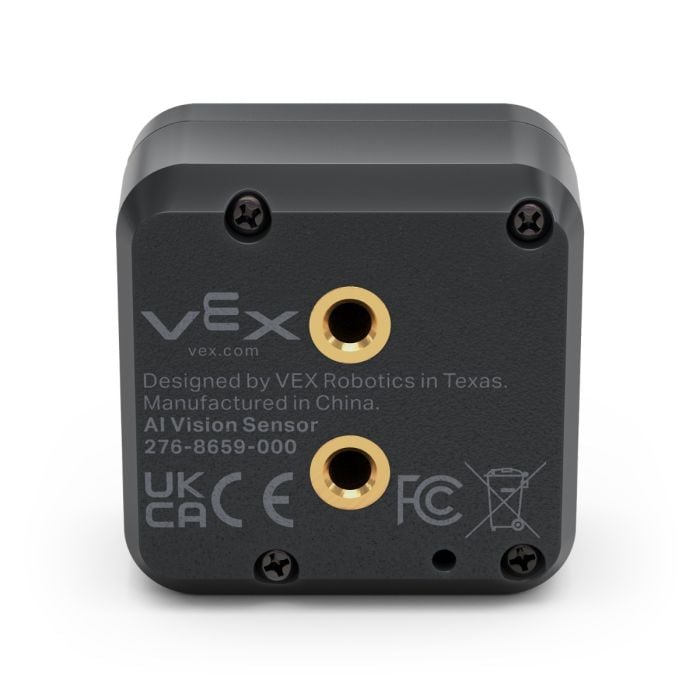
Two #8-32 threaded inserts provide for an easy attachment to your robot using any of the #8-32 VEX screws.
The AI Vision Sensor’s illuminated Smart Port is conveniently located on its side which allows for a secure connection with the V5 Robot Brain using a Smart Cable.
VEXcode V5 allows you to utilize the AI Vision Sensor to:
- Detect a pre-trained classification object
- Detect a color
- Detect a color code
- Detect an AprilTag
For more information on the V5 AI Vision Sensor, please see this article.
V5 Optical Sensor
The V5 Optical Sensor is a combination of the following sensors:
- Ambient light sensor
- Color sensor
- Proximity sensor
The Optical Sensor has a white LED to assist color detection in low light conditions.
The housing of this sensor has two mounting tabs with slotted holes to provide flexibility when mounting the sensor to your robot.
On the face of the sensor there is a small window where the optical sensors are located.
The Optical Sensor’s illuminated Smart Port is conveniently located on its side which allows for a secure connection with the V5 Robot Brain using a smart cable
VEXcode V5 allows you to utilize the Optical Sensor capabilities to:
- Turn the sensor’s white LED light on or off
- Set the white LED light’s percentage of power
- Detect an object
- Detect a color
- Measure the percent brightness of ambient light
- Measure the hue of a color in degrees
within example projects and custom user projects.
For more information on the V5 Optical Sensor, please see this article.
V5 Distance Sensor
The V5 Distance Sensor uses a pulse of classroom-safe laser light to measure the distance from the front of the sensor to an object.
It can also:
- detect an object and determine the relative size of the object.as small, medium, or large
- used to calculate a robot’s approach speed of the robot/sensor as it moves toward an object
The housing of this sensor has two mounting tabs with slotted holes to provide flexibility when mounting the sensor to a robot.
On the face of the sensor there is a small window where the laser beam is sent out and then received in order to measure distance.
The Distance Sensor’s illuminated Smart Port is conveniently located on its side which allows for a secure connection with the V5 Robot Brain using a smart cable.
VEXcode V5 allows you to utilize the Distance Sensor capabilities to measure:
- Distance to an object in millimeters or inches
- An object/robot’s velocity in meters per second
- An object’s size as small, medium, or large
- If an object is detected
within example projects and custom user projects.
For more information on the V5 Distance Sensor, please see this article.
V5 Inertial Sensor
The Inertial Sensor is a combination of a 3-axis (X, Y, and Z) accelerometer and a 3-axis gyroscope.
The accelerometer will detect a change in motion (acceleration) of your robot in any direction. The gyroscope electronically maintains a reference position so it can measure a rotational change of position of your robot in any direction against this reference.
There is a decal on the top of the sensor which conveniently locates the X, Y, and Z axes
The housing of the sensor has a single mounting hole which a #8-32 screw can pass through allowing it to be easily mounted to the robot’s structure.
On the bottom of the housing, there is a round boss which is sized to be inserted into a square hole of a piece of structural metal. This will keep the sensor fixed and aligned to its attachment point.
The Inertial Sensor’s illuminated Smart Port is conveniently located on its back, which allows for a secure connection with the V5 Robot Brain using a smart cable.
VEXcode V5 allows you to utilize the Inertial Sensor capabilities to:
- Calibrate the Sensor
- Set the robot’s heading
- Set the robot’s rotation
and/or measure:
- The robot’s heading
- The robot’s rotation
- The robot’s orientation in pitch, yaw, and roll
- The robot’s acceleration in the X,Y, or Z axis
- The robot’s gyro rate of the X,Y, or Z axis
within example projects and custom user projects.
For more information on the V5 Inertial Sensor, please see this article.
V5 Rotational Sensor
The V5 Rotation Sensor is capable of measuring the following values for a shaft:
- Rotational position
- Total rotations
- Rotation speed
The rotational position is measured from 0° to 360° with a 0.088 accuracy. The angle is determined absolutely and is not lost when the robot is powered off.
Shaft speed is measured by the sensor in degrees per second.
The Rotational sensor is compatible with both the 1/8” and the 1/4” VEX shafts.
The housing of this sensor has a shaft hole which is sized for the 1/4” VEX Shaft. This shaft hole is capable of rotating within the housing of the sensor.
The sensor housing also has a screw mounting hole which passes completely through the housing and will accommodate #8-32 screws in order to mount the sensor.
Note: The Rotational Sensor comes with two metal shaft inserts which can be inserted into the ¼” shaft hole in order to accommodate the ⅛” VEX shafts.
The Rotational Sensor’s illuminated Smart Port is conveniently located on its end, which allows for a secure connection with the V5 Robot Brain using a smart cable.
VEXcode V5 allows you to utilize the Vision Sensor capabilities to:
- Set the robot’s shaft position in degrees
and/or measure:
- The robot’s shaft angle in degrees
- The robot’s shaft position in degrees or turns
- The robot’s shaft velocity in rpm or dps
within example projects and custom user projects.
For more information on the V5 Rotational Sensor, please see this article.
Vision Sensor
The Vision Sensor gives sight to your robot.
It is capable of detecting up to 7 colors at once, including multi-colored objects.
- This sensor can be used for recognizing colors and color patterns
- This sensor can be used to follow an object
- This sensor can be used to collect information about the environment
Connect a phone or tablet to the V5 Robot Brain through built-in WiFi to stream a live feed of your robot's view to your device from the camera on the sensor’s front.
Two #8-32 threaded inserts provide for an easy attachment to your robot using any of the #8-32 VEX screws.
There are also Pin holes which can be utilized for attachment with the VEX IQ system, however, these will not provide the same level of securement as the VEX screws and threaded inserts will on a VEX V5 Robot.
There is a V5 Smart Port for connecting to the V5 Robot Brain on the bottom of the sensor. There is also a VEX IQ Smart Port which allows the sensor to be utilized with the VEX IQ system.
In addition, there is a micro USB port which allows you to connect the Vision Sensor to your device so it can be configured and tuned to identify different colors.
On the top of the sensor is a button which is used to place the sensor into firmware update mode (hold when you plug in USB).
There is also an LED which turns green when you first connect.
VEXcode V5 allows you to configure and tune the Vision Sensor using the Vision Utility and it allows you to utilize the Vision Sensor capabilities to:
- Take a snapshot
- Set the object count
- Measure the objects width, height, center x, center y, angle
- Count the number of objects
- Detect an object
within example projects and custom user projects.
There are also a number of other custom programming options available.
For more information on Vision Sensor, please see these articles.
Vision Sensor's Specifications
| V5 Vision Sensor Specifications | |
|---|---|
| Vision Framerate | 50 Frames per Second |
| Color Signatures | 7 independent colors |
| Color Codes | 2, 3, or 4 color signatures per color code |
| Image Size | 640 x 400 Pixels |
| Microcontroller | Dual ARM Cortex M4 and M0 |
| Connectivity | V5 Smart Port VEX IQ Smart Port USB Micro |
| Wireless | 2.4 GHz 802 .11 Wi-Fi Direct Hotspot with built in webserver |
| Compatibility | Any device with Wi-Fi and a browser |
| Size | 2.495" x 2.125" x 0.89" (63.4 mm x 54 mm x 22.6 mm) |
| Weight | 0.77 lbs (350 g) |